Neuron AI on Your Own Hardware
Most security teams would like help with the writing. Very few can send client findings to someone else’s cloud to get it.
Penetration test findings are among the most sensitive data an organization produces. Contracts, regulators and common sense all say the same thing: they stay inside the environment you control.
That’s why Neuron AI runs on your own hardware. The models live on your server, inference happens on your server, and your findings never leave your network to be written.
Your Models, Your Server
Neuron AI runs as a separate service alongside Neuron, either on the same host or on a dedicated machine with a GPU. Administrators download models from the Neuron AI admin pages, and that download is the only time it reaches out. On an air-gapped network, models are transferred in by hand.
A single build works on both GPU and CPU servers. With a supported NVIDIA GPU, Neuron AI offloads work to it automatically. Without one, it runs on optimized CPU code instead. Detect Hardware looks at the server and recommends settings for it. The download itself is about 600MB smaller than it used to be, because the GPU runtime is installed on the host rather than bundled.
The Right Model for Each Job
Not every task needs the same model. Drafting an executive summary is demanding. Suggesting a better phrasing for one sentence is not.
Function routing lets you choose a default model and send individual functions somewhere else:
- Engagement finding drafting
- Library variant drafting
- Engagement brief generation
- The content assistant in the editor
Put your largest model on brief generation and a faster one on everyday drafting, and match the work to the hardware you actually have.
Matching Your Library by Meaning
The best finding is usually one your team has already written and approved. When Neuron AI drafts a finding, it checks your Findings Library for content that covers the same issue and offers it field by field, side by side with the generated text. You decide which to keep.
That match is made on meaning, not wording. Neuron AI summarizes each finding into a short anchor and compares those, so a library entry titled one way still matches a draft that describes the issue differently, or in a different language. Administrators can classify the whole existing library in the background, at low priority, without slowing down live work.
Measure It, Don’t Guess
How fast is AI drafting on your server? Which model should handle briefs? Would a bigger model be worth the extra time?
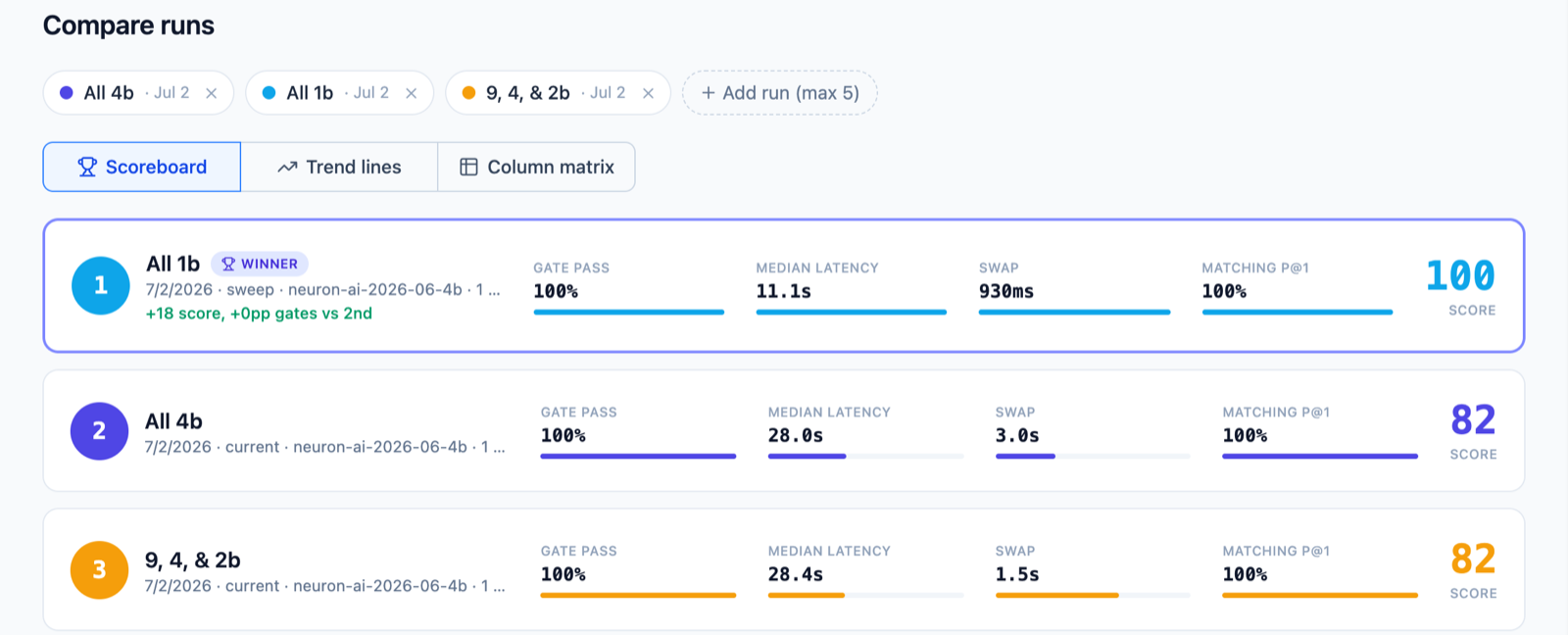
The Neuron AI Benchmark answers those questions with your own hardware. It measures speed, model swap cost, quality gates and library matching accuracy against a fixed dataset, with repeatable settings so runs on the same configuration are directly comparable. Benchmark your current setup, try candidate models without touching live routing, or sweep through models to find the best fit.
Select up to five runs and compare them on a scoreboard, as trend lines or as a full matrix, with a winner for each function.
Nothing Hidden
AI that writes client deliverables shouldn’t be a black box.
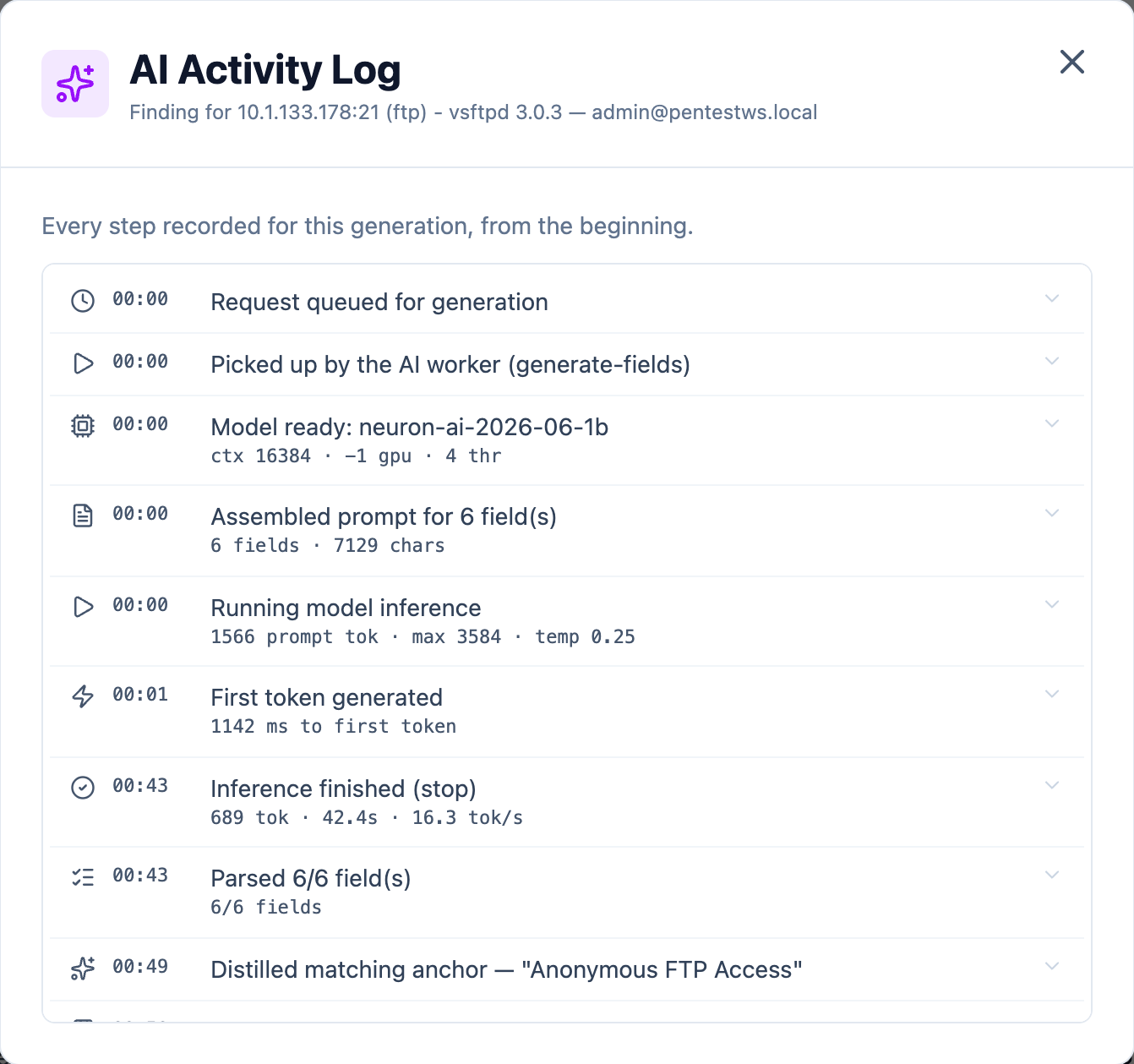
While a finding or brief is generating, a live activity log shows each step as it happens. Close the dialog and keep working; a status button in the top bar tracks it for you. Cancel a generation and anything produced so far is kept as a draft, not thrown away.
Afterwards, every generation is recorded in the Activity Log: who asked, what was generated, how long it took and every step along the way, down to the model, the token count and the speed.
The content assistant keeps its conversations too. Each field has its own thread, saved on the server, so closing the tab doesn’t lose the work, and a request keeps running even if you navigate away.
What This Means for Your Team
Your testers get help with the slowest part of the job, and your clients’ data stays where your contracts say it should. You decide which models run, on which hardware, for which tasks, and you can measure the result instead of taking it on faith.
Neuron AI is a licensed Neuron module. If you’d like to see it in action, visit https://neuron.ws/demo (opens in a new tab)
Thanks for reading,
The PenTest.WS Development Team

See Neuron on your terms.
Tell us about your team and environment. We will show you Neuron running the way you would run it: on your infrastructure, under your control.